
Knowledge Base
Change the default SSH port on a Linux Server
- Secure Shell (SSH) is a network protocol that allows users to access the server remotely. It also encrypts the communication between a client and a private server, making it more secure.
- However, using the standard Transmission Control Protocol (TCP) port 22 for SSH might be risky since it is vulnerable to many cyber threats, especially brute-force attacks – a hacking method used to gain access to encrypted sensitive data.
- Therefore, changing your default port is one of the best ways to protect your SSH server.
Connect to Your Server via SSH:
# ssh root@187.234.56.1
- You will be prompted to type the password or SSH keys. Once you’ve done so, the connection will be established.
Change SSH Configurations:
- Edit the SSH configuration file using a text editor such as nano or vi. The location of the configuration file may vary depending on your Linux distribution, but it is typically located at /etc/ssh/sshd_config.
- For example, you can use the following command to edit the file using nano:
# vi /etc/ssh/sshd_config - Find the line that reads #Port 22. Next, delete the number and # and replace it with the new SSH port number you want to use.
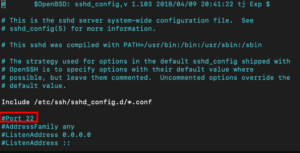
- Change the SSH port number to 10240.
- Save the changes and exit the text editor.
- Restart the SSH service for the changes to take effect. You can use the following command to restart the SSH service:
# systemctl restart sshdYou have successfully changed the default SSH port.

