
Knowledge Base
How to create mailing list?
Mailing lists are a good way to send a message or series of messages to many people at once. For example, many companies use mailing lists to email newsletters, promotional offers, or information about product updates to subscribers.
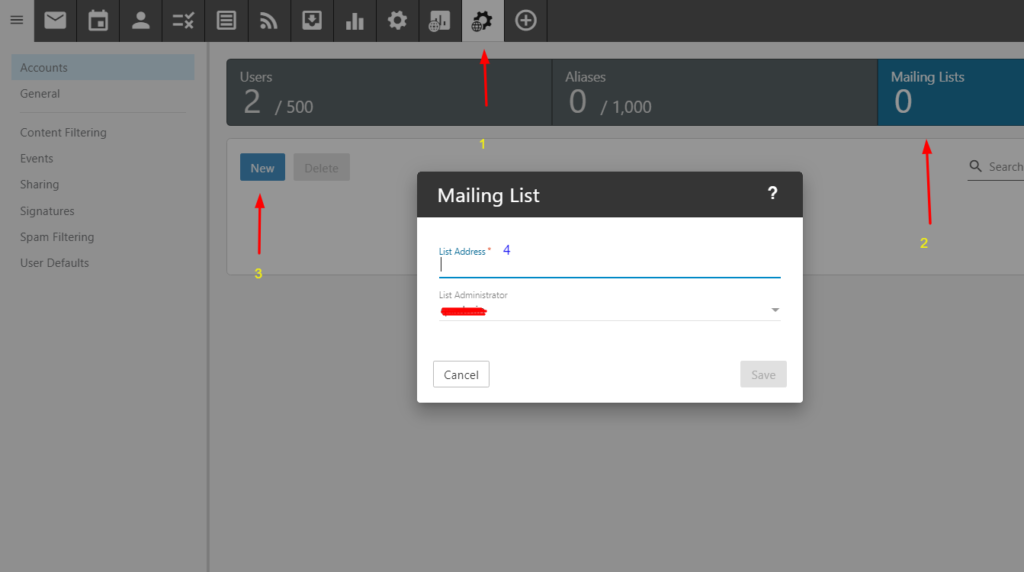
Follow these steps to create a new mailing list:
- Log in to Enterprise Email as the domain administrator.
- Click the Settings icon.
- Expand the Domain Settings and Mailing Lists folders.
- Click Mailing Lists in the navigation pane.
- Click New in the content pane toolbar.
- Click the List Settings tab and complete the appropriate fields. The Name and Moderator fields are required. All other list settings are optional. NOTE: Setting the Allowed Posters option to Anyone or Subscribers Only can cause spam issues. Generally, Anyone should never be used, and Subscribers Only should be used for digest mode.
- Click the Options tab and select the appropriate check boxes to enable the desired mailing list options.
- Click Save.

