
How to reset the password

  1. In previous article we saw how to create new email account in Biz mail, in this article we will how we can reset our forgotten password.
  2. Login to QualiSpace shop area with your login details
  3. Go to My Services Under Services Tab – Locate BizMmail Services – Click on “Manage”
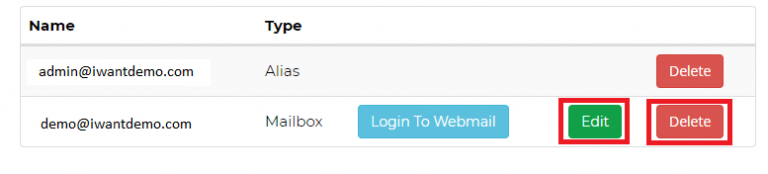
  4. Click on Edit tab beside the email ID whose password details you want to reset
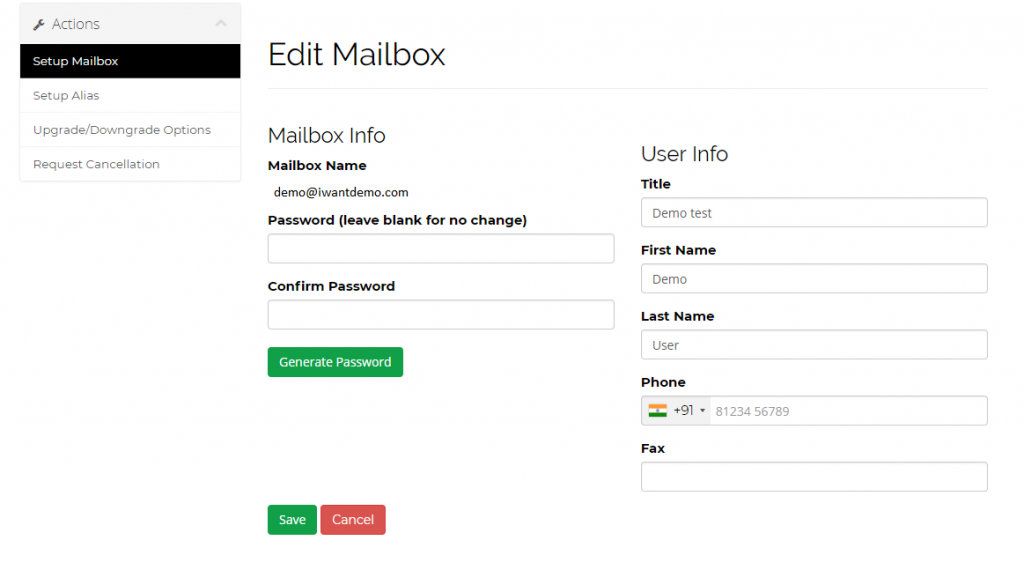
5. Enter the new password details and click on save.

Build Your Website with Hostiko

From professional business to enterprise, we’ve got you covered!

Copyright ©2026 QualiSpace. All rights reserved.

A Platform

QualiSpace
Privacy Overview

This website uses cookies so that we can provide you with the best user experience possible. Cookie information is stored in your browser and performs functions such as recognising you when you return to our website and helping our team to understand which sections of the website you find most interesting and useful.
