
Adding DNS record

DNS records serve to facilitate domain name translation and help visitors reach your website online. When a domain is created in Plesk, all the necessary DNS records are added automatically. However, Plesk also enables you to add custom DNS records, as explained below.

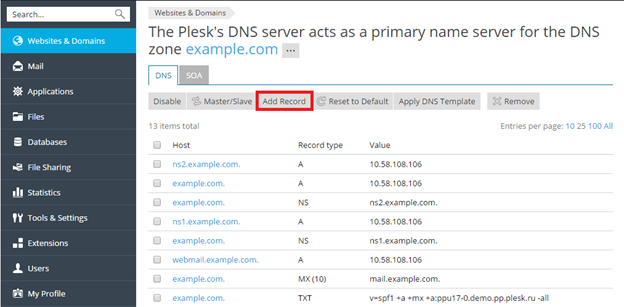
To add a DNS record to the domain’s DNS zone, go to Websites & Domains > DNS Settings > Add Record.
Build Your Website with Hostiko

From professional business to enterprise, we’ve got you covered!

Copyright ©2026 QualiSpace. All rights reserved.

A Platform

QualiSpace
Privacy Overview

This website uses cookies so that we can provide you with the best user experience possible. Cookie information is stored in your browser and performs functions such as recognising you when you return to our website and helping our team to understand which sections of the website you find most interesting and useful.

