
How to change file permissions from cPanel?
Every file and directory in Linux Operating System have access permissions. This feature gives the ability to the user for setting up different access levels for each user and also Operating system gets the ability to deal with different request for accessing the file.
There are three types of access: Read – Denoted as r, files with read access can be displayed to the user. Write – Denoted as w, files with write access can be modified by the user. Execute – Denoted as x, files with execute access can be executed as programs by the user.
These access permissions are given to three types of users: User − It is owner of the file. Group − It is the group of users in which Owner lies. World − It is referred to everyone else.
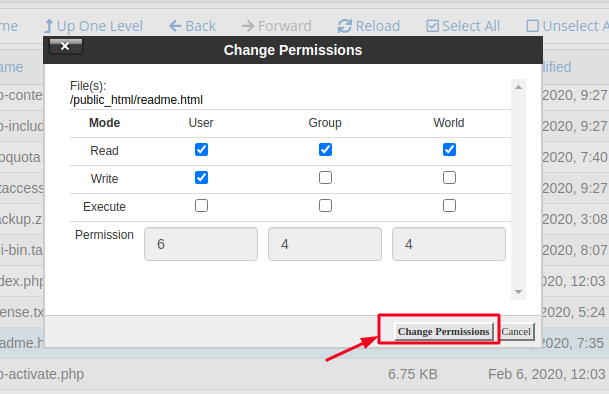
By default, cPanel File Manager gives 6-4-4 permissions to the users – 6 to the User, 4 to the Group and 4 to the World. Most of the time we do not need to change the file permissions unless needed.
You can change the file permissions in cPanel by following the below steps :
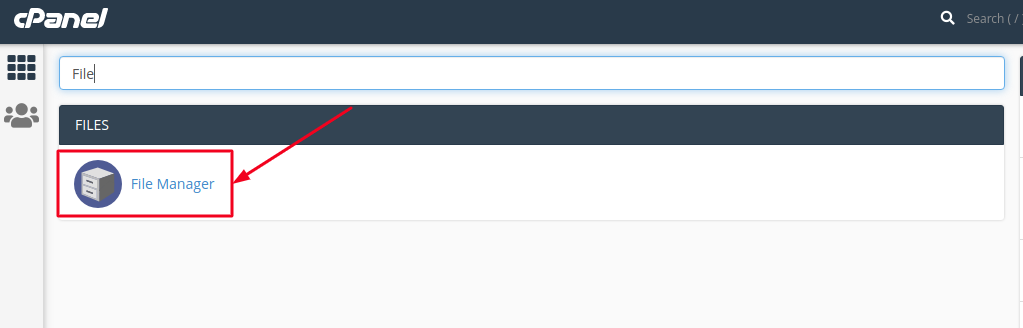
- Login to cPanel and search for File Manager and click on it.
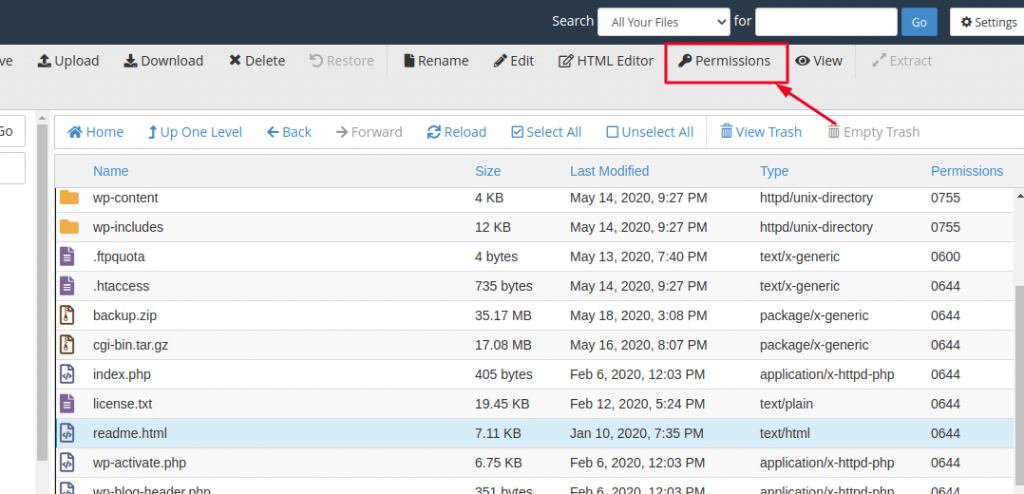
- Navigate to the File or Folder you wish to change permissions to and select the file or folder by a single click of the mouse and click on Permissions option from the Top menu of File Manager.
- You will see a pop up window as shown below. Choose permissions according to your need and then click on Change Permissions to save the new access permissions of the file.
That’s it. You’ve successfully changed the Permissions of the file.

