
Knowledge Base
Steps to obtain domain EPP code
Steps to obtain “EPP code/Auth code” from Client Area while transferring the domain:
- Login to your client area (URL: https://shop.qualispace.com/clientarea.php)
- Go to Domain section > Search for your domain.
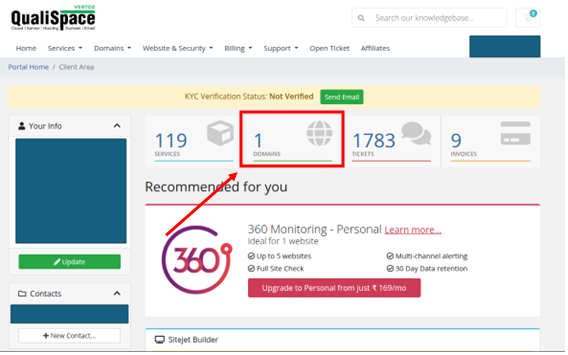
- Click here to access your domain.
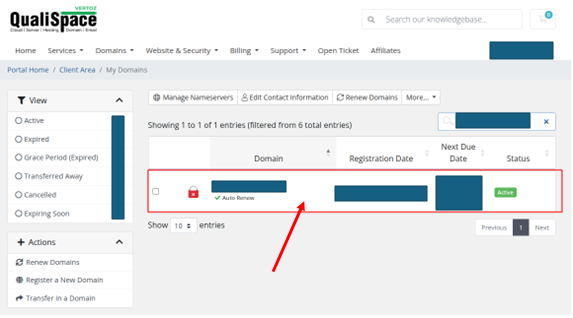
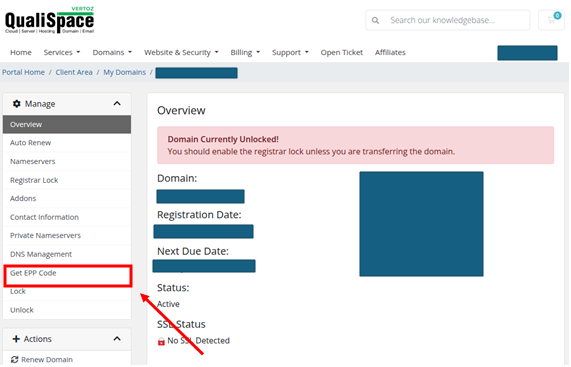
- Click on Get EPP Code
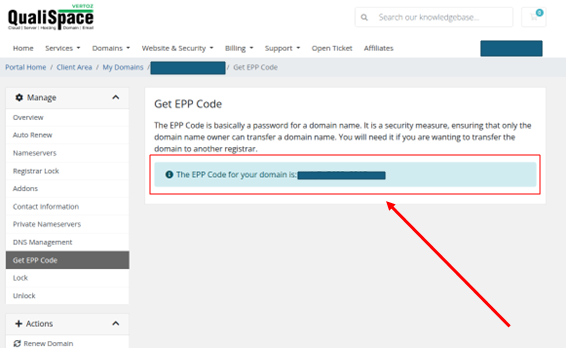
- The EPP code should now be visible.
NOTE: While initiating a transfer process always check the status of the domain from the mentioned link:https://www.whois.com/
The status should be “OK”.If the status is “Client Transfer Prohibited” or any other lock kindly contact us to disable the lock.
Steps to obtain “EPP code/Auth code” from Client Area while transferring the domain:
- Login to your client area (URL: https://shop.qualispace.com/clientarea.php)
- Go to Domain section > Search for your domain.
- Click here to access your domain.
- Click on Get EPP Code
- The EPP code should now be visible.
NOTE: While initiating a transfer process always check the status of the domain from the mentioned link:https://www.whois.com/
The status should be “OK”.If the status is “Client Transfer Prohibited” or any other lock kindly contact us to disable the lock.

