
Assign directory permissions in Plesk control panel

  • Login to Plesk control panel
  • goto httpdocs folder or your folder path
  • select your folder and click on the right side of the folder options icon. Select the ‘change permissions’ option there.
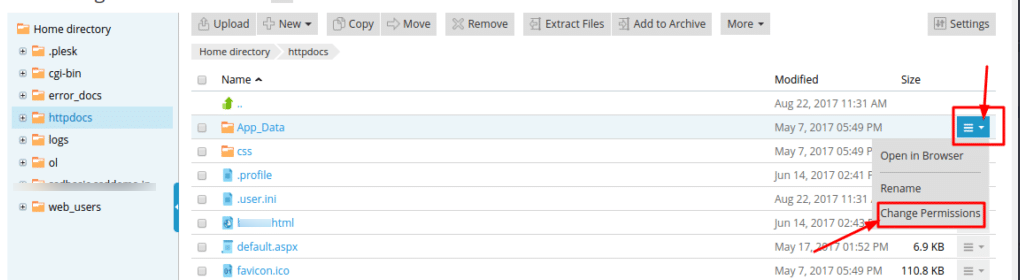
Assign Directory Permissions

  • On the next screen, you can see permissions of the user, from there you can enable and disable permission rights by click check and uncheck the checkboxes.
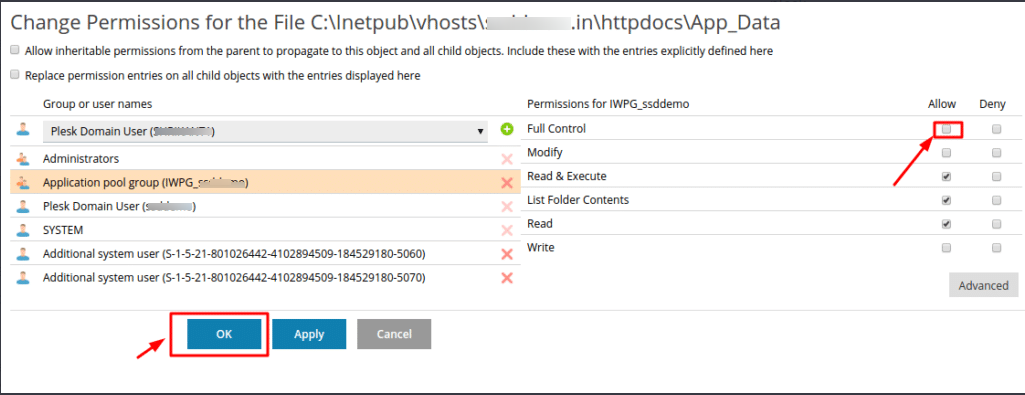
  • At last click on the OK button.

Build Your Website with Hostiko

From professional business to enterprise, we’ve got you covered!

Copyright ©2026 QualiSpace. All rights reserved.

A Platform

QualiSpace
Privacy Overview

This website uses cookies so that we can provide you with the best user experience possible. Cookie information is stored in your browser and performs functions such as recognising you when you return to our website and helping our team to understand which sections of the website you find most interesting and useful.

